

Mock server
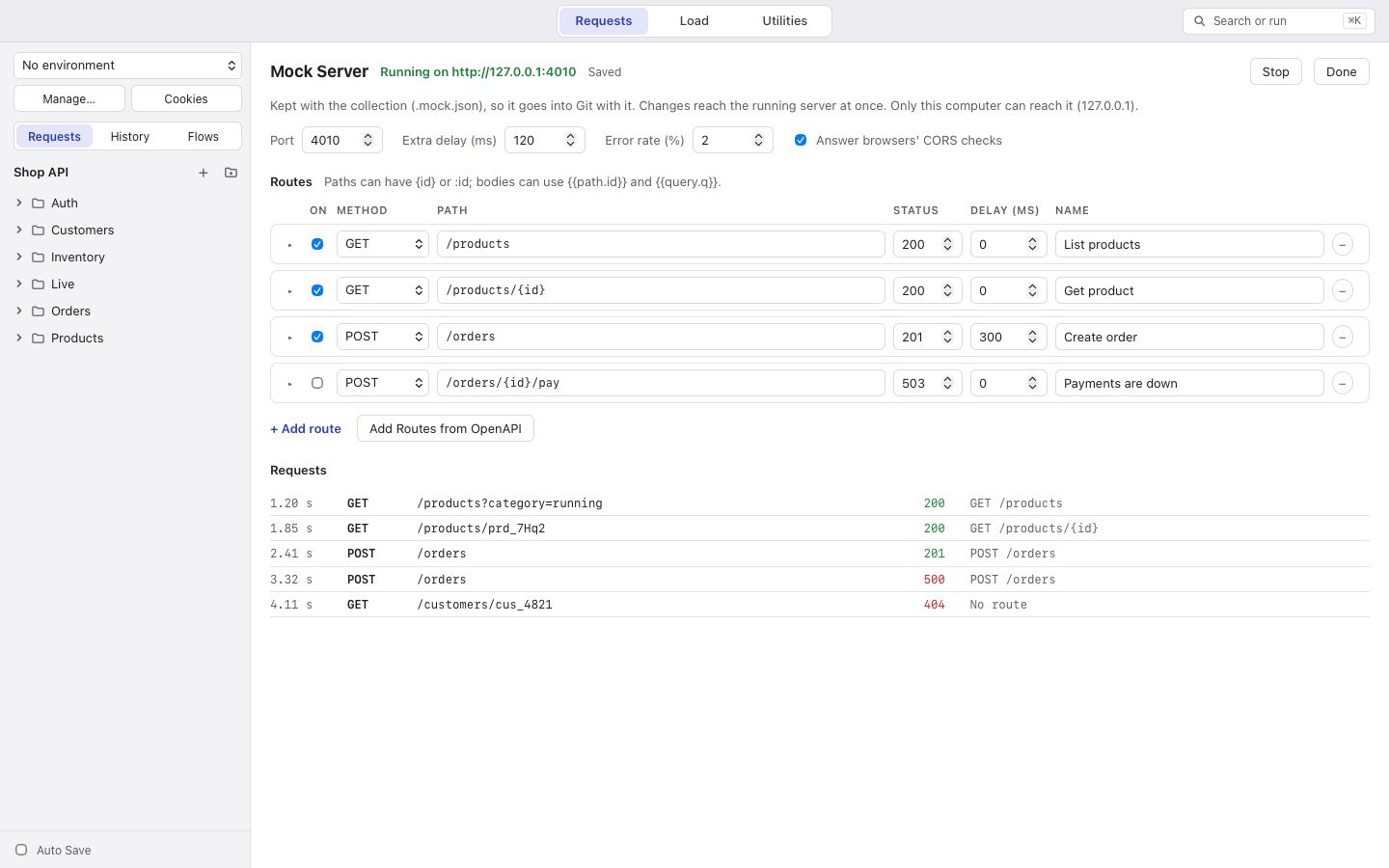
Open Mock Server from the collection’s menu or with Search or Run… (⌘K). Its routes are saved in the collection
as .mock.json, so they travel with your files.
Routes
Section titled “Routes”Each route has a method (or ANY), a path (with {id}, :id or * for the parts that vary), a status, headers, a
body and a delay. The body can use {{path.id}} and {{query.q}} to answer with what was asked.
The first route that matches answers. A request that matches none gets a 404 that lists the routes.
Make routes by hand, with Add Routes from OpenAPI (one per operation in the collection’s spec), or from a response: Save As ▾ > Mock Route.
Settings
Section titled “Settings”Choose the port (4010 at first), an extra delay for every answer, an error rate (that share of requests gets a 500 on purpose), and whether to answer CORS requests.
Changes to routes take effect while the server runs. Changing the port needs a restart.
The server listens on 127.0.0.1 only, so other computers cannot reach it. The page shows the last 1,000 requests it
received.